How to Get a Polymarket API Key and Build a Trading Bot
How to get a Polymarket API key and build a trading bot. Full guide to CLOB authentication, py-clob-client code examples, and bot architecture for 2026.
If you want to trade Polymarket programmatically, whether that means pulling live odds, automating an execution strategy, or building a full trading bot, you need to understand how Polymarket's API is actually structured. It is not a simple copy paste key from a dashboard. It is built directly on top of your wallet, and getting it wrong is the single biggest reason developers hit a wall of opaque 401 errors on their first request. This guide walks through exactly how the system works, how to generate your own credentials, and where a purpose built API can save you the parts of this that are genuinely painful to build yourself.
Two APIs, Not One
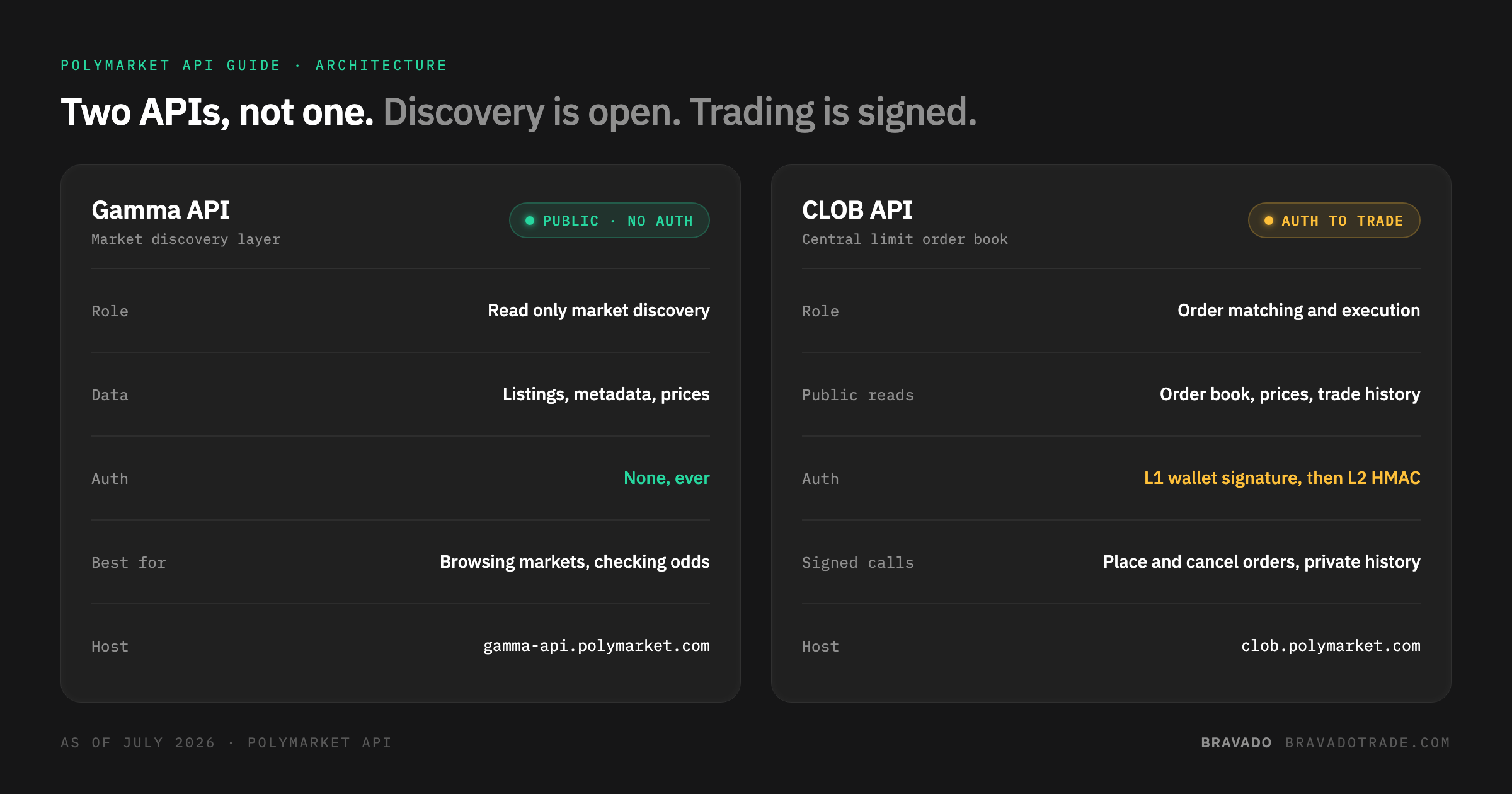
The first thing that trips people up is that Polymarket splits its API into two completely separate services with different rules.
The Gamma API is the public, read only discovery layer. It handles market listings, metadata, and prices, and it requires no authentication at all. If you just need to browse markets or check current odds, you can skip authentication entirely.
The CLOB API is where actual trading happens. Polymarket runs a Central Limit Order Book, the same order matching structure used by traditional exchanges like Coinbase, rather than an automated market maker model. Reading the order book, prices, and trade history from the CLOB is also unauthenticated. Placing orders, cancelling them, and pulling your own private order and trade history requires full authentication.
How Authentication Actually Works
Polymarket's CLOB uses two layers of authentication, and understanding the difference between them matters.
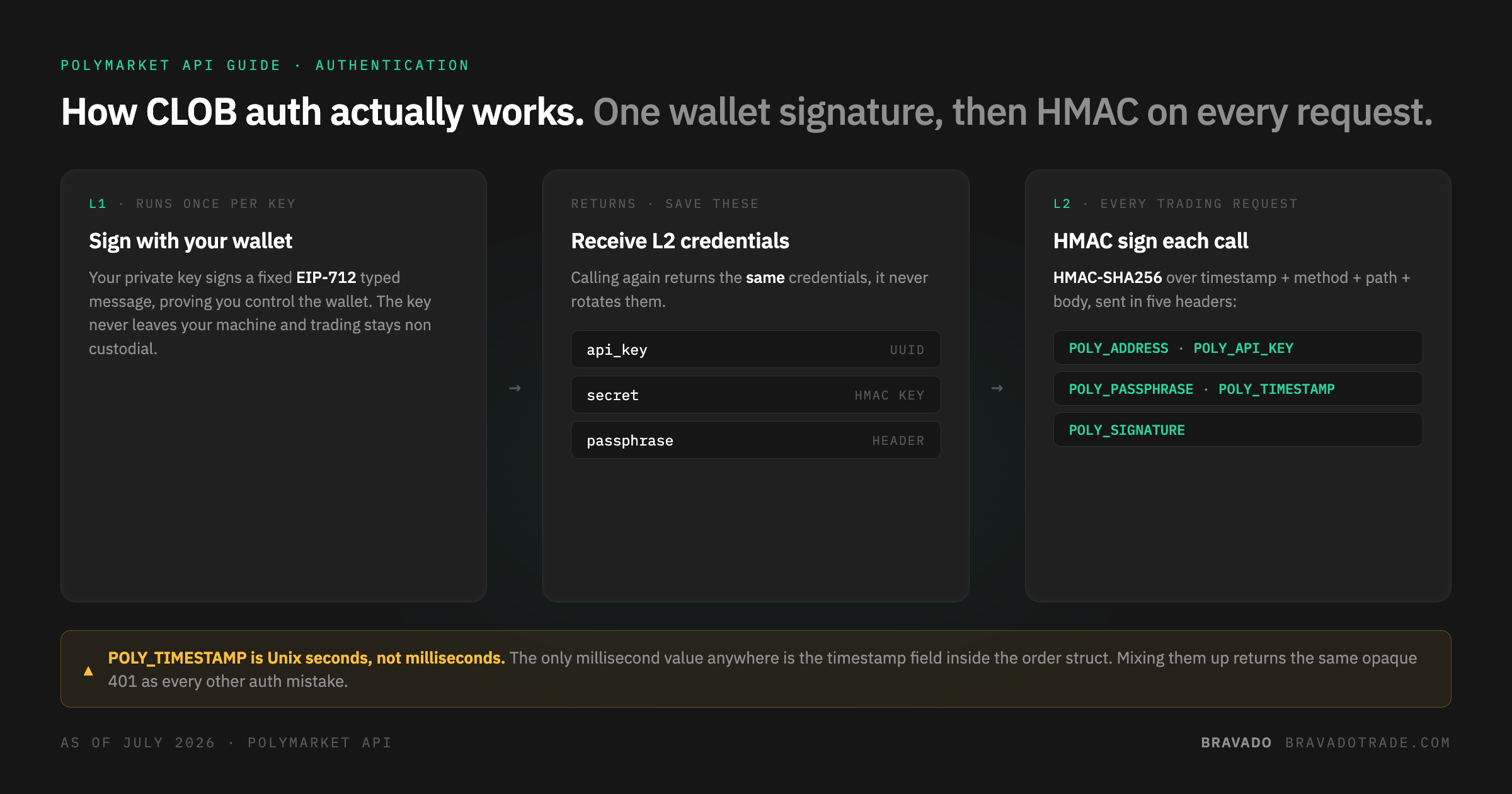
L1 authentication uses your wallet's private key to sign a fixed EIP-712 typed message, proving you control that wallet. You only need to do this once per key. It is used for exactly one sensitive action: creating or deriving your L2 credentials. Your private key never leaves your machine and trading stays non custodial throughout.
L2 authentication is what you actually use on every trading request afterward. The L1 signature returns three values: an API key (a UUID), a secret, and a passphrase. From there, every authenticated CLOB request gets signed with an HMAC-SHA256 signature built from your timestamp, method, path, and request body, using that secret. Five POLY_* headers carry your address, API key, passphrase, timestamp, and signature on each call.
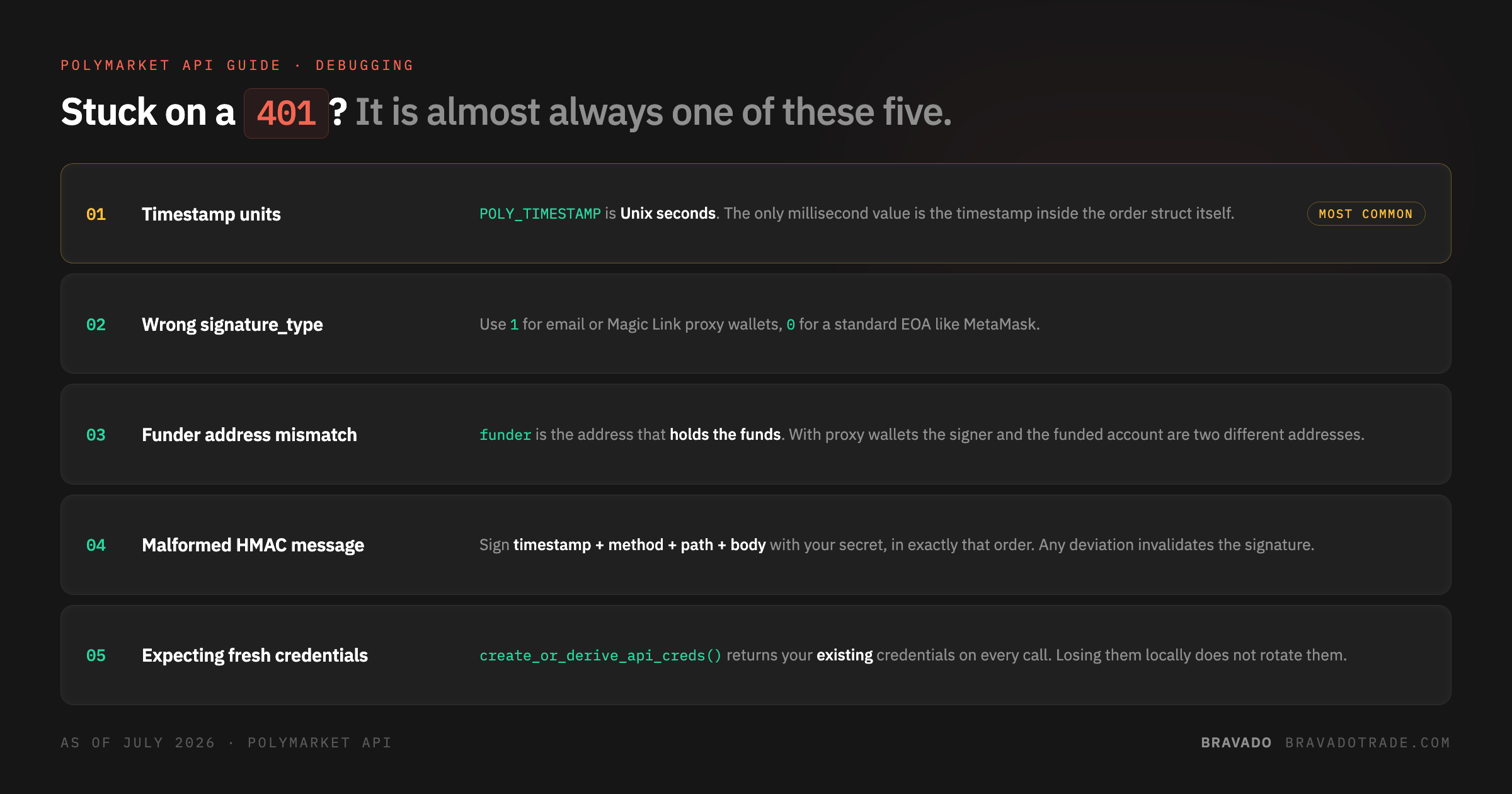
One detail worth flagging because it trips up even experienced developers: timestamps in the POLY_TIMESTAMP header are in Unix seconds, not milliseconds. The only Polymarket value that uses milliseconds is the timestamp field inside the order struct itself. Get this wrong and you will get the same opaque 401 as almost every other auth mistake.
Step by Step: Generating Your Own API Key
Polymarket publishes an official Python client, py-clob-client, that handles the EIP-712 signing for you so you are not implementing cryptographic signatures by hand.
python
from py_clob_client.client import ClobClient

HOST = "https://clob.polymarket.com"
CHAIN_ID = 137  # Polygon mainnet
PRIVATE_KEY = "<your-wallet-private-key>"
FUNDER = "<your-funder-address>"

client = ClobClient(
    HOST,
    key=PRIVATE_KEY,
    chain_id=CHAIN_ID,
    signature_type=1,   # 1 for email/Magic proxy wallets, 0 for standard EOA
    funder=FUNDER        # the address that actually holds your funds
)

creds = client.create_or_derive_api_creds()
print("API Key:", creds.api_key)
print("Secret:", creds.api_secret)
print("Passphrase:", creds.api_passphrase)
A few things to get right here. The funder address matters because if you signed up through an email or Magic Link wallet, the address doing the signing and the address holding your funds are two different things, and orders need to be attributed to the funded account. If you are using a standard MetaMask style wallet, signature_type should be 0 instead. Once you have your three credentials, save them somewhere secure, since create_or_derive_api_creds() will simply return your existing credentials on subsequent calls rather than generating new ones.
From here you can place an order directly:
python
from py_clob_client.clob_types import OrderArgs, OrderType
from py_clob_client.order_builder.constants import BUY

client.set_api_creds(creds)

order_args = OrderArgs(
    token_id="<token-id>",  # get this from the Gamma API for your target market
    price=0.65,
    size=10,
    side=BUY,
)

signed_order = client.create_order(order_args)
resp = client.post_order(signed_order, OrderType.GTC)
print(resp)
That is genuinely the entire flow for a basic authenticated trade. The complexity shows up once you try to run this at any real scale.
Where This Gets Hard: Data
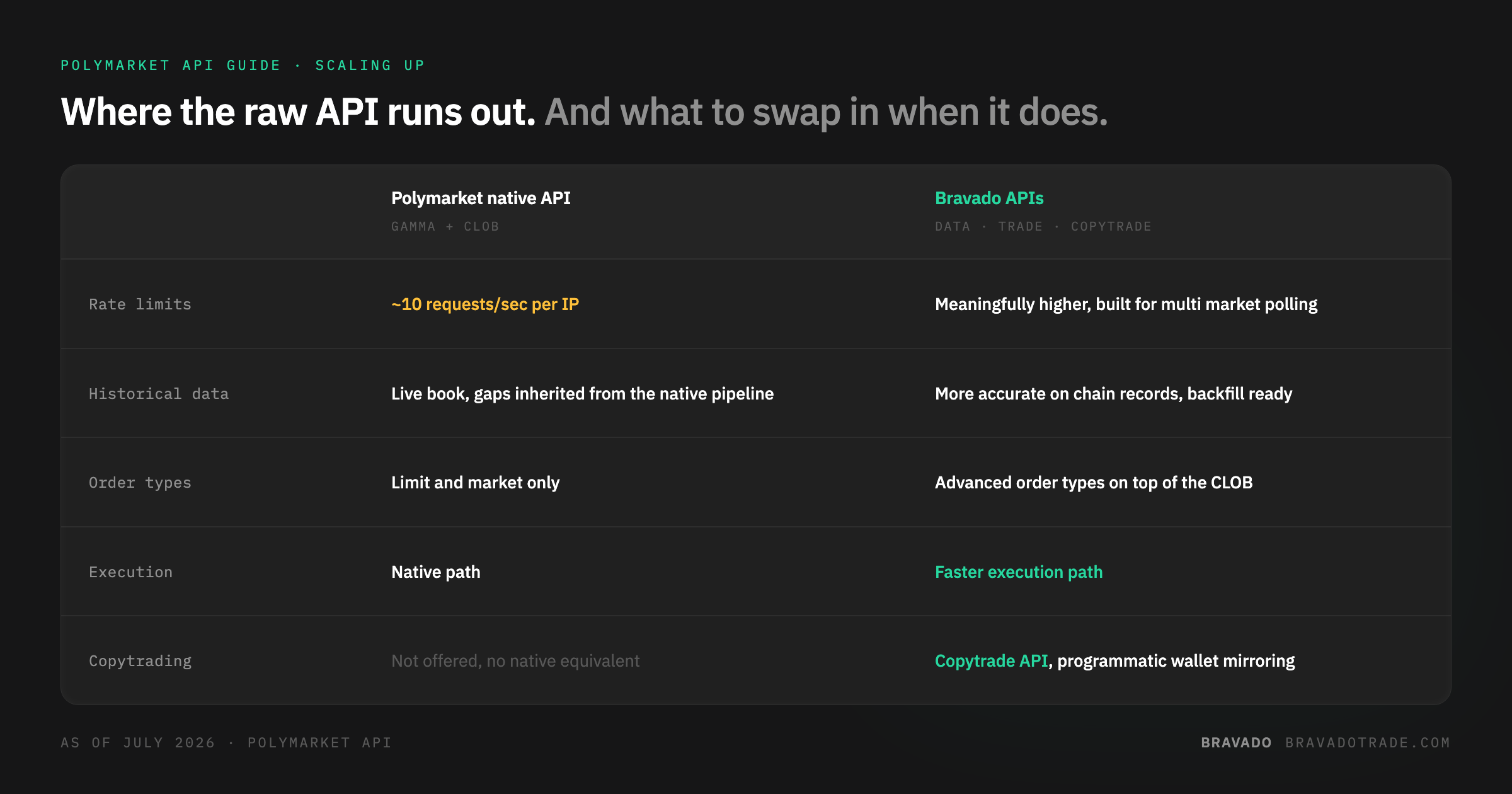
Once you move past a one off script, the first thing that breaks is data. Polymarket's native rate limits sit around 10 requests per second per IP, which is workable for casual polling but tight if you are tracking multiple markets, running backtests, or need historical depth beyond what the live order book gives you. You also inherit whatever gaps exist in Polymarket's own data pipeline, since it was not built with institutional grade auditability as the primary goal.
This is the specific gap Bravado's Data API is built to close. It sits on top of the same on chain Polygon data but with more accurate historical records and meaningfully higher rate limits than Polymarket's native API, which matters the moment your bot needs to poll more than a handful of markets or backfill history for a strategy. If your bot's biggest bottleneck is data reliability rather than trading logic, this is usually the first thing worth swapping out.
Building the Bot: Core Architecture
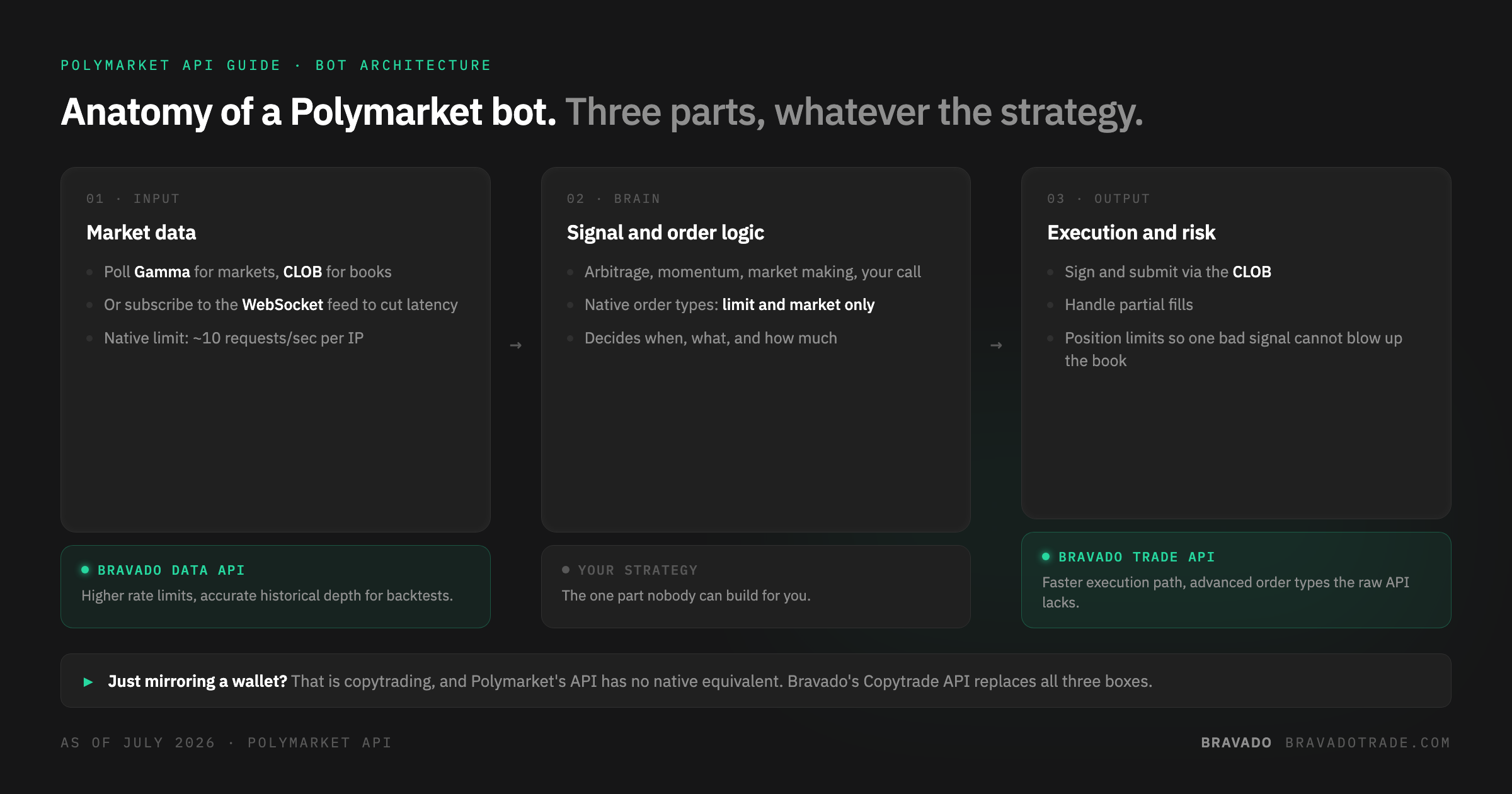
A basic Polymarket trading bot has three moving parts regardless of strategy.
1. Market polling. Pull prices and order book depth for your target markets on a loop, or subscribe to Polymarket's WebSocket feed for real time updates instead of polling, which meaningfully cuts latency for anything time sensitive.
2. Signal and order logic. Whatever your strategy is, arbitrage between correlated markets, momentum on breaking news, simple market making, this is where you decide when and what to trade. This is also where order type matters. Polymarket's native API supports standard limit and market orders, but nothing more sophisticated than that out of the box.
3. Execution and risk management. Signing and submitting orders, handling partial fills, and setting position limits so one bad signal does not blow up your book.
For execution specifically, this is where Bravado's Trade API is worth building against instead of the raw CLOB. It runs faster than Polymarket's native execution path and supports advanced order types the native API simply does not offer, which matters once your bot's logic gets more sophisticated than basic limit orders.
The Bot You Don't Have to Build: Copytrading
A large share of "trading bot" requests are really just an attempt to mirror a specific wallet's activity rather than run original strategy logic. If that is your actual goal, building it from scratch means polling a target wallet's transaction history, parsing fills off the CLOB, and racing to replicate the trade before the opportunity closes, all logic you would be writing and maintaining yourself.
This is not something Polymarket's own API offers at all. It is a capability gap, not a speed difference. Bravado's Copytrade API exists specifically to fill it, giving you programmatic access to copy trading functionality that has no native Polymarket equivalent to build against in the first place.
Putting It Together
If you are just experimenting, the official py-clob-client and a wallet is genuinely enough to get started, and understanding the L1/L2 auth flow above will save you hours of debugging opaque errors. But the moment your bot needs to scale, whether that is more markets, faster execution, more sophisticated order types, or copytrading logic Polymarket has no answer for, that is the point where building directly against Polymarket's raw API stops being the fast path and starts being the slow one. Bravado's Trade API, Data API, and Copytrade API were built to cover exactly those gaps for developers building seriously on top of Polymarket.
This guide reflects Polymarket's public API documentation as of July 2026. API endpoints and rate limits are subject to change, so check the official docs before deploying anything to production.